Not long ago, turning a book into an audiobook meant booking studio time, hiring a narrator, and spending weeks (or months) in post-production. The process was expensive, slow, and out of reach for most independent authors and small publishers.
That has changed. AI text-to-speech has matured to the point where you can transform a full manuscript into a narrated audiobook with expressive, natural-sounding voices — complete with chapters, character differentiation, and emotional pacing. It does not replace the art of human narration, but it opens a door that was previously locked for anyone without a production budget.
What Is an AI Audiobook Maker?
An AI audiobook maker goes well beyond a basic text-to-speech reader. While older TTS tools would robotically read text aloud in a single monotone voice, a modern AI audiobook maker handles the full production workflow:
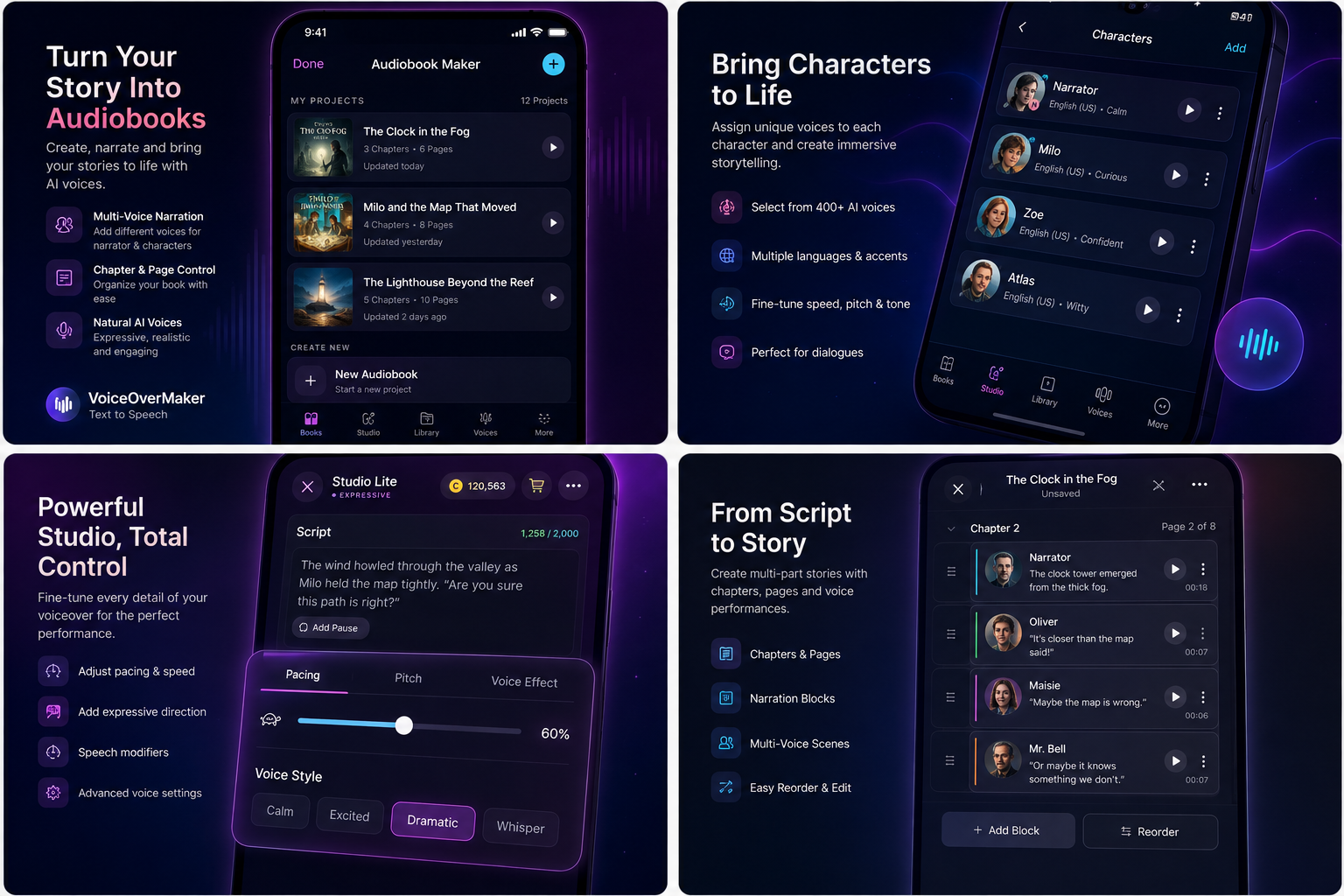
- Chapter organization — split your book into logical sections that export as separate audio files
- Multi-voice narration — assign different AI voices to the narrator, protagonist, and supporting characters
- Emotional direction — control warmth, tension, excitement, or sadness in specific passages
- Pacing control — adjust speed, add pauses, and manage rhythm across scenes
- Export and distribution — produce audio files ready for platforms or personal listening
Think of it less as a "reader" and more as a virtual narrator you can direct.
Step 1: Prepare Your Manuscript for Audio
Before you feed your book into any AI tool, spend time cleaning up the text. What reads well on a page does not always sound right when spoken aloud.
Here is what to fix first:
- Remove or rewrite URLs and email addresses — a TTS engine will try to pronounce "www.example.com" literally
- Spell out abbreviations — "Dr." becomes "Doctor," "St." becomes "Street" or "Saint" depending on context
- Expand numbers thoughtfully — "2,400" should be "two thousand four hundred" in narration, but "24" in a casual dialogue line might stay as-is
- Simplify footnotes and endnotes — either integrate them into the text or remove them entirely
- Mark chapter breaks clearly — use consistent heading formats so you can split the book easily later
Start by testing a few representative paragraphs. Pick a passage with dialogue, one with description, and one with technical content. Listen to how the AI handles each before committing to a full-book generation.
Step 2: Divide the Book Into Chapters
Audiobook listeners navigate by chapter. Your chapter structure becomes the table of contents for the audio file, and most distribution platforms require chapter markers.
Within each chapter, consider how you want to handle different types of content. A useful approach is to think in blocks:
Chapter 3: The Market

[Narrator] The morning crowd pressed through the narrow
aisles between wooden stalls. Steam rose from the bread
vendor's cart, carrying the smell of rosemary into the
cool air.

[Elena] "Two loaves, please. The sourdough, not the rye."

[Narrator] The vendor paused, looking at her with the
kind of recognition that meant trouble.

[Vendor] "Haven't seen you here in weeks. Your usual
order has changed, I take it?"
This block-based structure makes it straightforward to assign voices and control pacing at the scene level rather than sentence by sentence.
Step 3: Choose Your Narrator
The narrator voice carries the entire book. It is the voice readers will spend hours with, so take time choosing one that fits your genre and tone.
When evaluating voices, listen for:
- Pronunciation accuracy — does it handle your specific vocabulary correctly?
- Natural pacing — does it pause at commas and breathe at paragraph breaks?
- Warmth vs. authority — a memoir needs a different energy than a thriller
- Emotional range — can the voice convey subtle shifts, not just flat reading?
- Consistency — does it maintain the same character across long passages?
Test your top two or three choices against the same passage before deciding. A voice that sounds great reading descriptive prose might fall flat in dialogue-heavy scenes.
Step 4: Give Characters Their Own Voices
One of the biggest improvements in AI narration over the last year is multi-character voice support. Instead of a single narrator attempting different inflections for each character, you can assign entirely separate voice profiles.
VoiceOverMaker's audiobook workflow makes this practical. You define your cast — narrator, protagonist, antagonist, supporting characters — and assign each a voice with its own characteristics. During generation, the app switches between voices automatically based on your chapter structure.
Tips for choosing character voices:
- Give the protagonist a voice you could listen to for hours — it carries the emotional weight
- Make the antagonist distinctly different in tone, not just pitch
- Minor characters need less differentiation — a slight shift in energy is enough
- The narrator voice should feel neutral enough to not compete with character voices
Step 5: Direct the Performance
AI narration responds to direction. You are not stuck with a flat, default reading. Modern emotional text-to-speech lets you shape how each section sounds.
Think of yourself as an audiobook director:
- Pacing — slow down for reflective moments, speed up slightly during action
- Intensity — quiet, intimate scenes need lower energy; confrontations need higher
- Pauses — add deliberate pauses before reveals or after emotional beats
- Emotional tone — mark sections as tense, warm, melancholy, playful, or urgent
You do not need to direct every sentence. Focus on key moments — chapter openings, climactic scenes, emotional turns. The AI will maintain reasonable defaults for everything else.
Step 6: Generate Small Sections First
Resist the urge to generate your entire book in one pass. Start with representative scenes from different parts of the manuscript:
- A dialogue-heavy scene to test voice switching
- A long descriptive passage to check pacing and listener fatigue
- An emotionally charged moment to evaluate expressive delivery
- A scene with unusual vocabulary or proper nouns
Listen carefully to each test. Take notes on what works and what needs adjustment. It is far easier to refine your settings on a two-minute clip than to re-generate an entire chapter.
Step 7: Review Like an Editor
Once you generate full chapters, listen with an editor's ear. Common issues to watch for:
- Mispronunciations — character names, place names, and domain-specific terms often need correction
- Unnatural pauses — sometimes the AI inserts breaks in odd places
- Inconsistent voice — check that character voices remain stable across chapters
- Pacing drift — long chapters might lose energy; consider splitting them or adding direction markers
- Emotional mismatch — a comedic scene read with too much gravitas, or a serious scene that sounds too light
Regenerate individual sections as needed. Good audiobook production is iterative, whether the narrator is human or AI.
Creating an Audiobook on iPhone
If you prefer working on mobile, VoiceOverMaker is built as a mobile-first audiobook maker. The entire workflow — importing text, organizing chapters, assigning voices, directing performance, and exporting audio — runs natively on iPhone and iPad.
The mobile-first approach has practical advantages:
- Paste text from any writing app or cloud document
- Listen to test generations through headphones wherever you are
- Make adjustments during commutes or between other tasks
- Export finished chapters directly to Files, iCloud, or sharing platforms
You do not need a studio, a desktop editing suite, or any specialized hardware. Your iPhone is the production tool.
AI Narration vs. Traditional Narration
Both approaches have their place. Here is an honest comparison:
Choose AI narration when:
- You need to produce audio quickly without waiting for studio availability
- Budget is limited — AI generation costs a fraction of human narration
- You want to iterate rapidly on different voices and styles
- You are producing content at volume (serialized fiction, educational material, documentation)
- You want full creative control without managing a production team
Choose traditional narration when:
- The book relies heavily on nuanced, improvised performance
- You have budget for a professional narrator who brings their own interpretation
- The target audience expects a specific celebrity or known voice
- The content includes complex accents or dialects that need human judgment
Many authors use AI narration for early drafts and listener testing, then decide whether to invest in human narration based on the response. Others find that AI narration meets their quality bar entirely.
Start Creating Your Audiobook
The gap between manuscript and audiobook has never been smaller. If you have a book, a novella, a short story collection, or any long-form text, you can turn it into a narrated audio experience today.
VoiceOverMaker gives you the tools: multi-character voices, chapter management, emotional direction, and a mobile workflow that fits into your life. Download it and start with a single chapter — you will hear how far AI narration has come.